 ODM
Downloads that
don’t give up.
ODM is a free, open download manager for Windows and Linux. Several connections per file, carries on after a crash, saves the videos a page plays, and does torrents too.
Windows 10 & 11, 64-bit · 7.9 MB · No admin rights · MIT licence
Needs you 1
- fedora-workstation-41.isoThe link expired at 38%. Your progress is safe.
Downloading 2· 3.3 GB left
- 8.4 MB/subuntu-24.04-desktop-amd64.iso3.1 GB of 5.9 GB · 6 min left
- 5.8 MB/sSintel (2010) 1080p614 MB of 1.1 GB · 2 min left
Up next 5· 2.9 GB + 1 unknown left
- blender-4.5-windows-x64.zip412 MB · 1st in line
- debian-13-amd64-netinst.iso754 MB · 2nd in line
- node-v24-x64.msi31 MB · 3rd in line
- linuxmint-22.2-cinnamon-64bit.isoPaused at 37% · 4th in line
- conference-keynote.m3u85th in line
Finished 1
- annual-report-2026.pdf4.2 MB · Finished
This isn’t a screenshot. Drag Up next by its handles, press Sort by size, fix the expired link. Time runs at 24× because you have things to do.
- Chrome
- Edge
- Brave
- Vivaldi
- Opera
- Firefox
- Floorp
Downloading 6· everything it does
Everything a download needs, nothing it doesn’t
- Up to 32 parts
Several connections, one file
Each download is split into parts that arrive at once. If ODM is closed or the PC restarts, every part picks up from where it stopped.
- 7 browsers
Takes over from your browser
Click a download link as usual and ODM takes it, cookies and all.
- MP4, MKV or MP3
Saves the videos a page plays
Plain video files, HLS streams, and videos on YouTube, Facebook, Instagram, X, TikTok, Vimeo and more, as video or as MP3.
- Never seeds
Torrents and magnet links
Open a .torrent file or click a magnet link, tick the files you want, and change your mind later.
- You pick who's next
A queue that does what you say
Drag it into the order you want, or sort it by size. Run it at night, then let ODM sleep, shut down or quit, after a 60-second countdown you can cancel.
- Nothing to restart
The details, handled
Speed limits from the status bar, the tray or a schedule, proxy settings, a custom user agent, and Settings that apply at once.
Close it mid-download. It can take it.
ODM writes down what it has as it goes, so a crash, a closed window or a pulled plug only costs a few seconds. This one’s a live copy of the parts map from the details panel: try the Close button.
0 of 8 parts finished
- Status
- Ready
- Downloaded
- 0 B of 360.0 MB
- Speed
- —
- Time left
- —
- Connections
- Up to 8
Up next 5· new in 0.5
Some reviews said ODM was hard to use. They had a point.
So 0.5 rebuilt every screen around one idea: you should never have to wonder what to press.
- 1st in line
One click, and it's all underneath
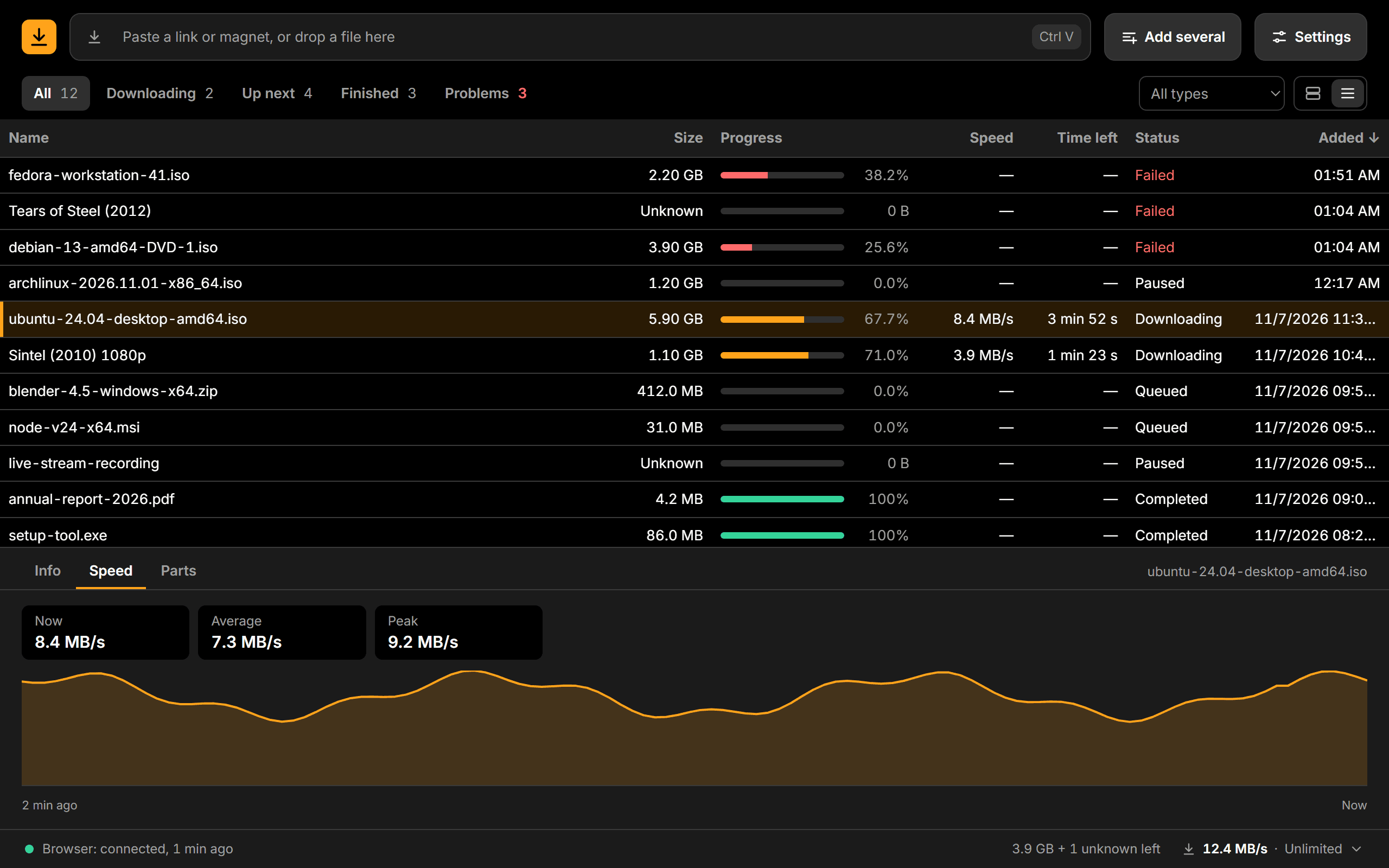
Click any download and its details sit in a panel under the list: progress, a two-minute speed graph, the parts as they arrive, and a torrent's files and peers. Select a few and it adds them up. Ctrl+A selects the lot.
- 2nd in line
The next step is on the download
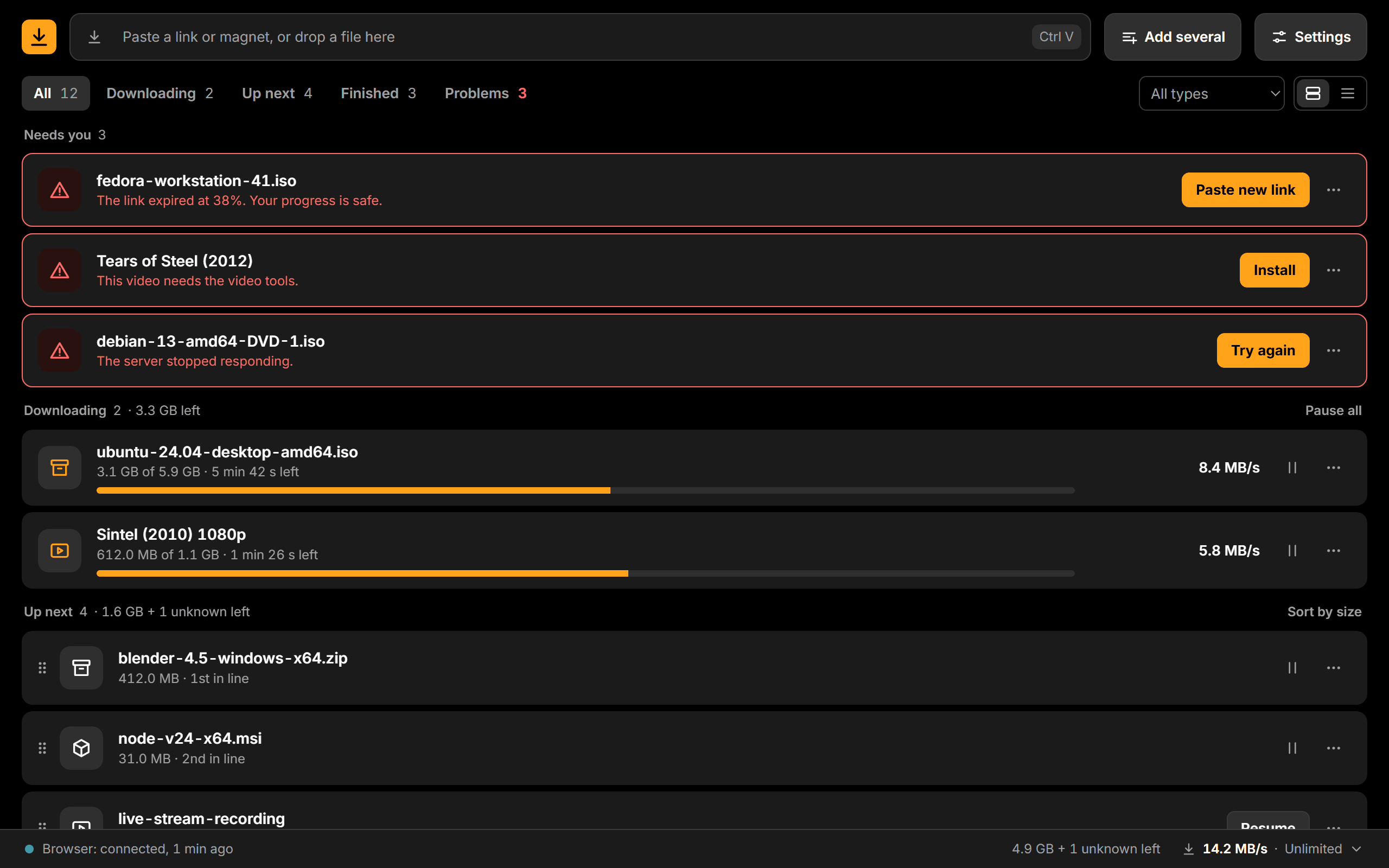
No more selecting a row to wake up a toolbar. Every download carries its own button: Pause, Resume, Open. Problems go to the top under Needs you, and the table you know is one click away.
- 3rd in line
Paste. That's the whole form
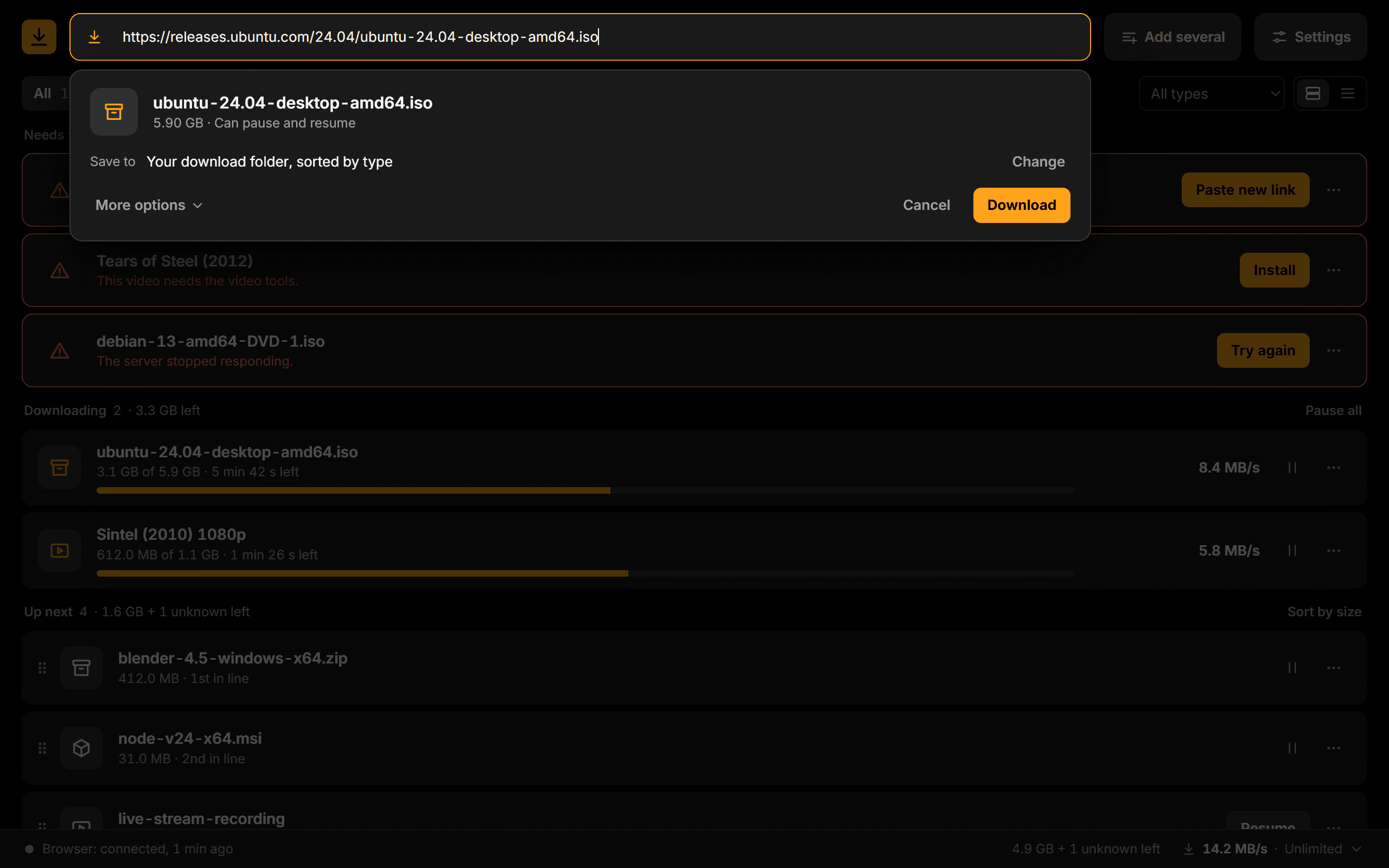
Press Ctrl+V anywhere in ODM. It reads the link and shows what it found, and the five fields you never filled in now wait under More options.
- 4th in line
You decide who goes first
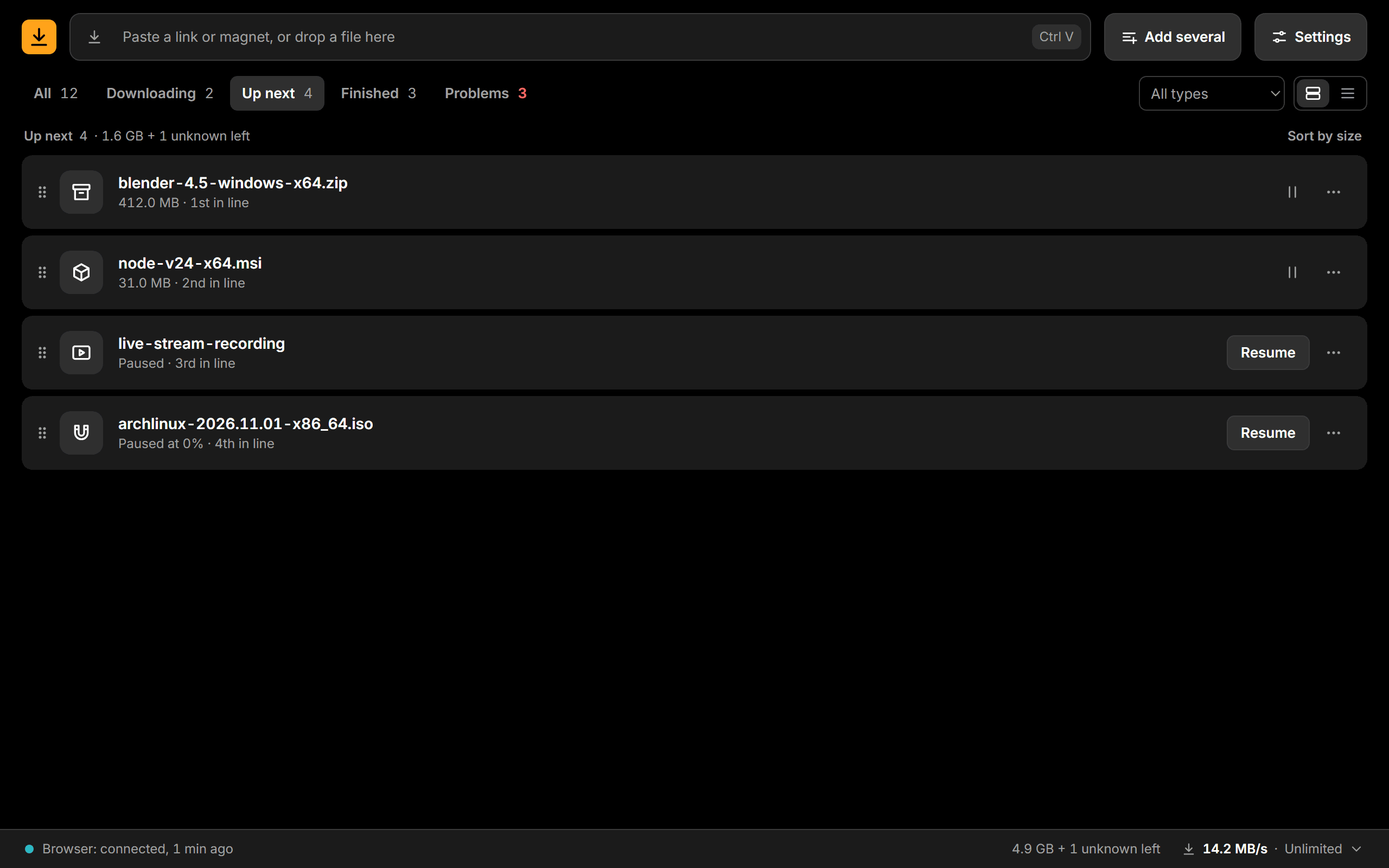
Drag rows in Up next, send one to the top, or press Sort by size: smallest first, and largest first on the second click. The status bar adds up what's left.
- in line
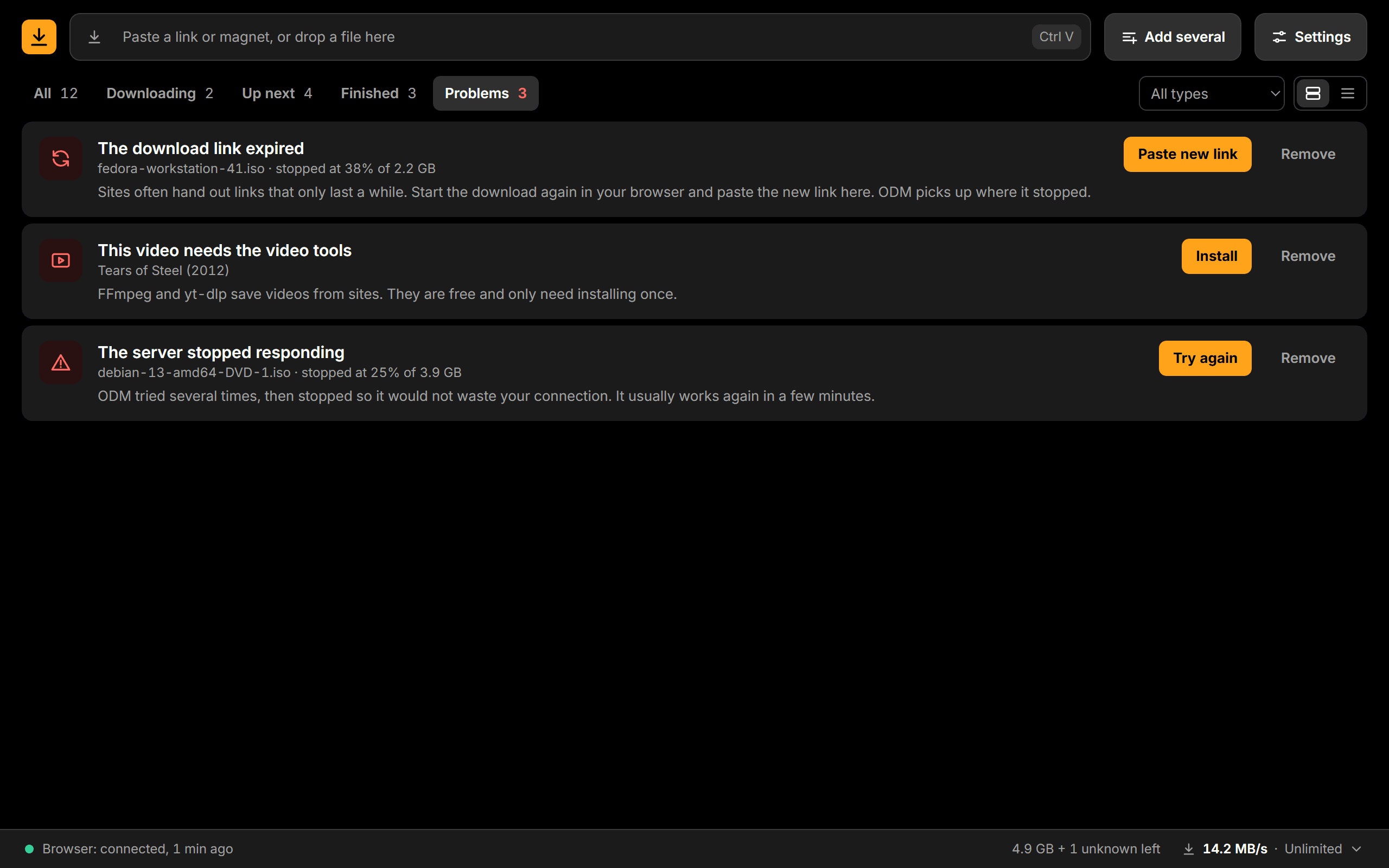
When it breaks, it says so in plain words
A failed download tells you what happened and puts the fix on the row. The raw error is still there for the curious, under Technical details.
Video
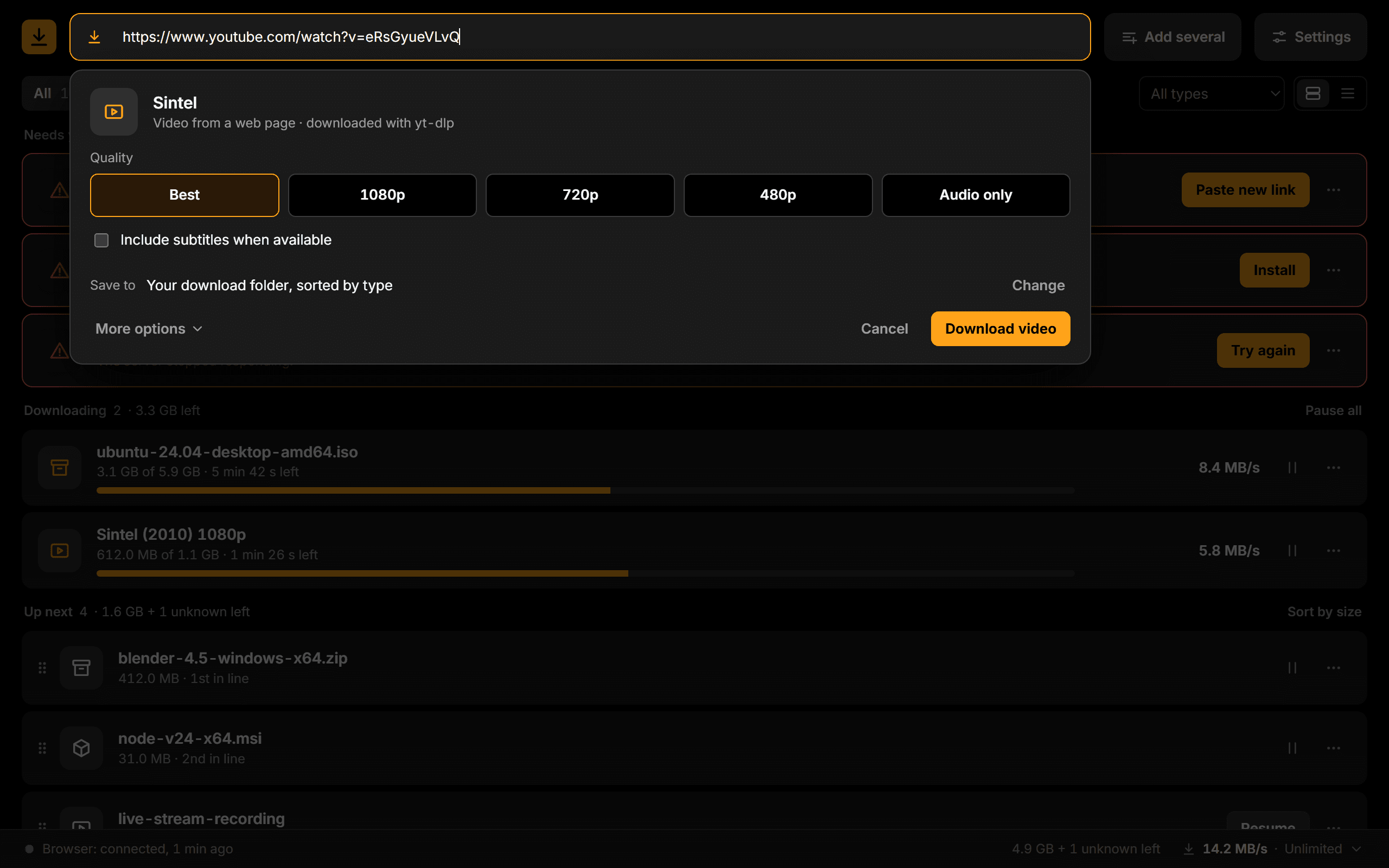
If a page plays it, ODM can save it
Buttons appear on the videos a page plays: MP4 or MP3, your call. Video files download like any other, HLS streams come down segment by segment and join into one file, and the big sites go through yt-dlp at the quality you pick.
On YouTube you don’t even have to open the video: hover any thumbnail, on a channel, in search or in Shorts, and a small ↓ offers video or MP3.
The video bar on a page drags wherever you want it and has a × that actually works now. The video tools (FFmpeg, yt-dlp and Deno) are an optional one-click download, each checked against its published checksum, and ODM only asks you to update them when there’s something newer.
Torrents
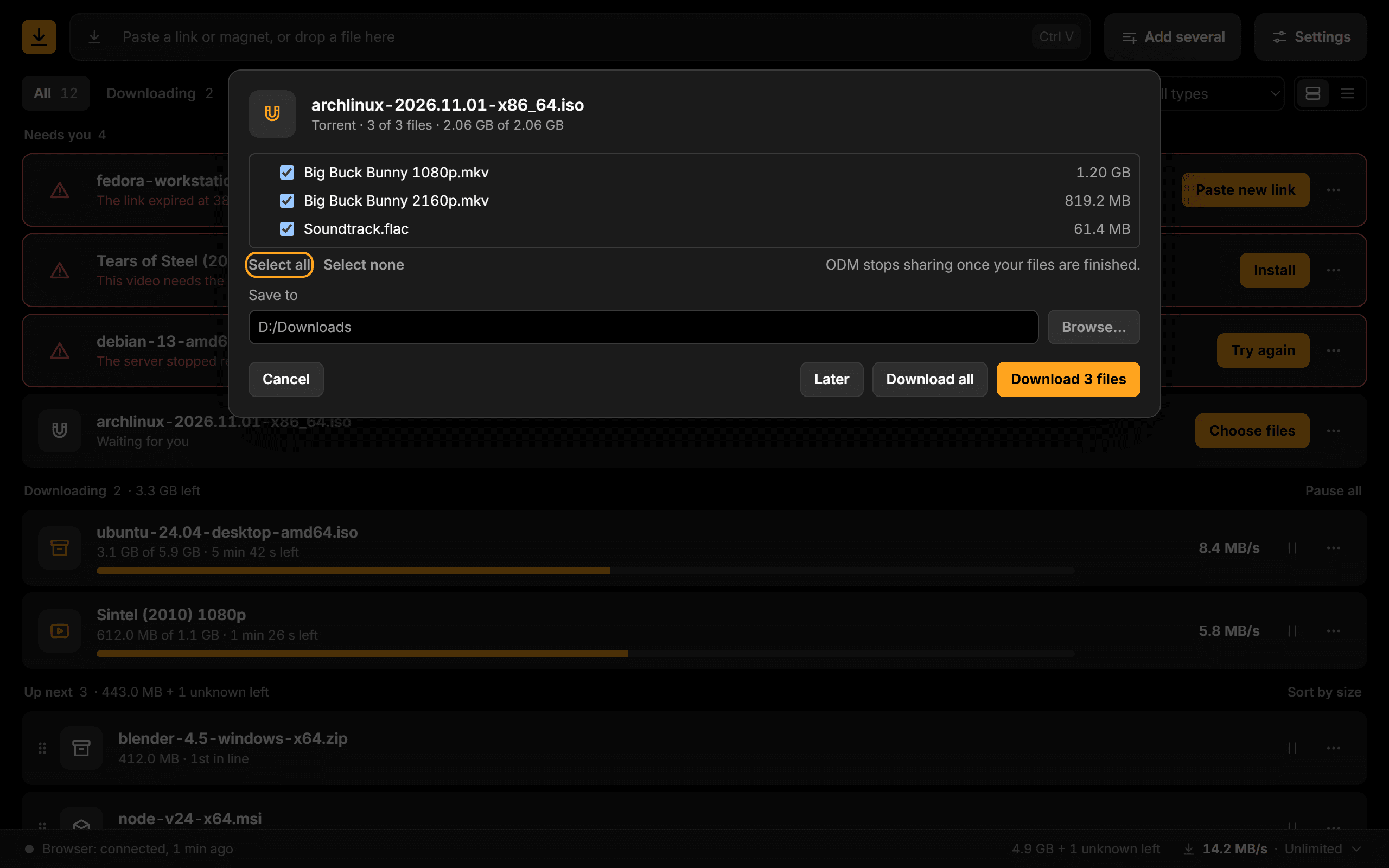
Take the files you want, leave the rest
Open a .torrent file or click a magnet link, and ODM shows what’s inside before a byte arrives. Untick what you don’t need, and change your mind later: unticked files take no disk space.
Peers, a piece map and per-file progress while it runs. ODM is a downloader, not a seeding client: once the files are complete, the torrent stops sharing.
Screenshots · 100% safe for work
Familiar colours. Completely innocent downloads.
Yes, we know what black and orange remind you of. It’s a download manager, we promise. Swipe through anyway.
01Everything in its place. Nobody needs to know what's in “Other”.
Scroll over it to spin it faster. Drag works too.Swipe it sideways to spin it.
Browser extension
Get the extension
ODM’s welcome screen sets it up for you. The store listings are in review; until they’re approved, the extension installs by hand in about a minute. Updating from an older ODM? Load this one too: the MP3 buttons and the video bar live in the extension.
Finished 3· in about a minute
Up and running
- 1st in line
Run the installer
It installs for your user only, so it asks for no admin rights. The installer isn’t code-signed, so Windows may show a blue warning first. Click More info, then Run anyway. On Linux, open the .deb or .rpm with your software installer, or make the AppImage executable and run it.
- 2nd in line
Add the extension
The welcome screen takes it one step at a time: pick your browser, follow three short steps, and it moves on by itself once the extension is talking to ODM.
- 3rd in line
Optional: get the video tools
One click fetches FFmpeg, yt-dlp and Deno into ODM’s own folder. After that, ODM keeps itself up to date, and every update is signed and verified first.
Problems 12· before you download
Questions, with the fix on the row
Why does this colour scheme look… familiar?
No idea what you mean. Black and orange are easy on the eyes at 2 a.m., and that's the official story. ODM downloads Linux ISOs, podcasts and holiday photos, and it does it very well.
Windows says “Windows protected your PC”. Is it safe?
That warning appears because the installer isn't code-signed, not because anything was found in it. Click More info, then Run anyway. The full source is on GitHub if you'd like to read it or build it yourself.
Does ODM seed torrents?
No. ODM downloads torrents and stops there: it never uploads to other people, and there is no seeding to manage. When a torrent finishes, it's just a finished download.
Can I choose what downloads next?
Yes. Drag rows in Up next, use Move to top in a row's menu, or press Alt+Up and Alt+Down. Sort by size puts the smallest first, and a second click puts the largest first. The order decides what starts next and never stops something already running. For many at once, select them and use the action bar above the list, or right-click.
Can I save a video as MP3?
Yes. Every video the extension finds offers video or MP3: on the button over it, in the page's video list and in the popup. On YouTube, the ↓ on any thumbnail offers both without opening the video. For a YouTube or other site link pasted into ODM, pick Audio only. MP3s land in your Music folder. ODM needs FFmpeg for it, which the video tools install. Update the app and the extension together, because the buttons live in the extension.
Can I download only some files from a torrent?
Yes. ODM shows the files before anything downloads, so you tick the ones you want. You can tick or untick files later in the Files and peers tab under the list, and unticked files take up no disk space.
Does ODM run on Linux?
Yes, from version 0.2.0. There's a .deb for Ubuntu, Debian and Mint, an .rpm for Fedora and openSUSE, and an AppImage that runs almost anywhere. Magnet links and .torrent files open in ODM there too.
Do I need admin rights?
Not on Windows: ODM installs for your user only, so it never asks for an administrator password. On Linux, the .deb and .rpm install system-wide like any package; the AppImage needs no install at all.
How do updates work?
ODM checks GitHub for a new version, tells you when there is one, and installs it with one click. Your downloads pause, ODM restarts, and they carry on. Every update is signed, and ODM refuses one whose signature doesn't match the key built into it. On Linux, the AppImage, .deb and .rpm update from inside ODM from version 0.4.3 on; a .deb or .rpm asks for your system password. Coming from 0.4.2 or older, install the new package from this page once.
Why install the extension by hand?
The Chrome Web Store, Edge Add-ons and Firefox listings are still in review. Until they're approved, ODM's welcome screen walks you through loading the extension yourself. It takes about a minute.
What do the video tools do?
Saving site videos needs FFmpeg, yt-dlp and Deno. ODM offers them as one optional download and checks each file against its published checksum. Copies you already have on your PATH work too.
Does ODM collect anything about me?
No. There are no accounts, no analytics, no ads and no tracking. What the extension hands over — the address, its cookies and the referring page — goes to ODM on your own computer and nowhere else. Update checks fetch a small file from GitHub and send nothing about you, and you can turn them off.